An IP address is a numerical label assigned to a device or network interface that uses the Internet Protocol. Its main purpose is to identify a destination or source for network communication.
When data moves across a network, it is divided into smaller units called packets. Each packet contains information about where it came from and where it needs to go. IP addresses help routers forward these packets through the network. The destination address tells the network where the packet should ultimately arrive, while the source address identifies the sender from a networking perspective.
An IP address can be assigned to many different types of equipment. A public website may use one or more public IP addresses. A company’s firewall may have a public address on the Internet-facing side and private addresses on its internal side. A laptop may use a private address inside an office while accessing the Internet through the office router’s public address.
The address itself does not describe everything about the device. It does not automatically identify the user, operating system, physical location or purpose of the connection. Those details may be inferred by other systems, but they are not encoded completely in the IP address.
How Do IP Addresses Work?
When you connect to a network, your device usually receives an IP address through a configuration process. In a home network, the router may assign a private address automatically. In a data center, an administrator may configure an address manually or use an automated management system.
Once the device has an address, it can communicate with other devices that are reachable through the same network or through a router. Routers examine destination addresses and decide where to forward packets. The decision is based on routing information that describes which networks are reachable through different interfaces or providers.
For example, when a user visits a website, the browser first needs to discover the website’s IP address. The domain name is translated into an address through the Domain Name System, or DNS. The browser then opens a connection to that address. Routers across the Internet forward the traffic until it reaches the server or service responsible for the website.
The process is usually invisible to the user. People remember names such as example.com, while networks work with IP addresses and routing information. This separation makes the Internet easier to use because a service can change its underlying address without requiring users to memorize a new number.
What Is IPv4?
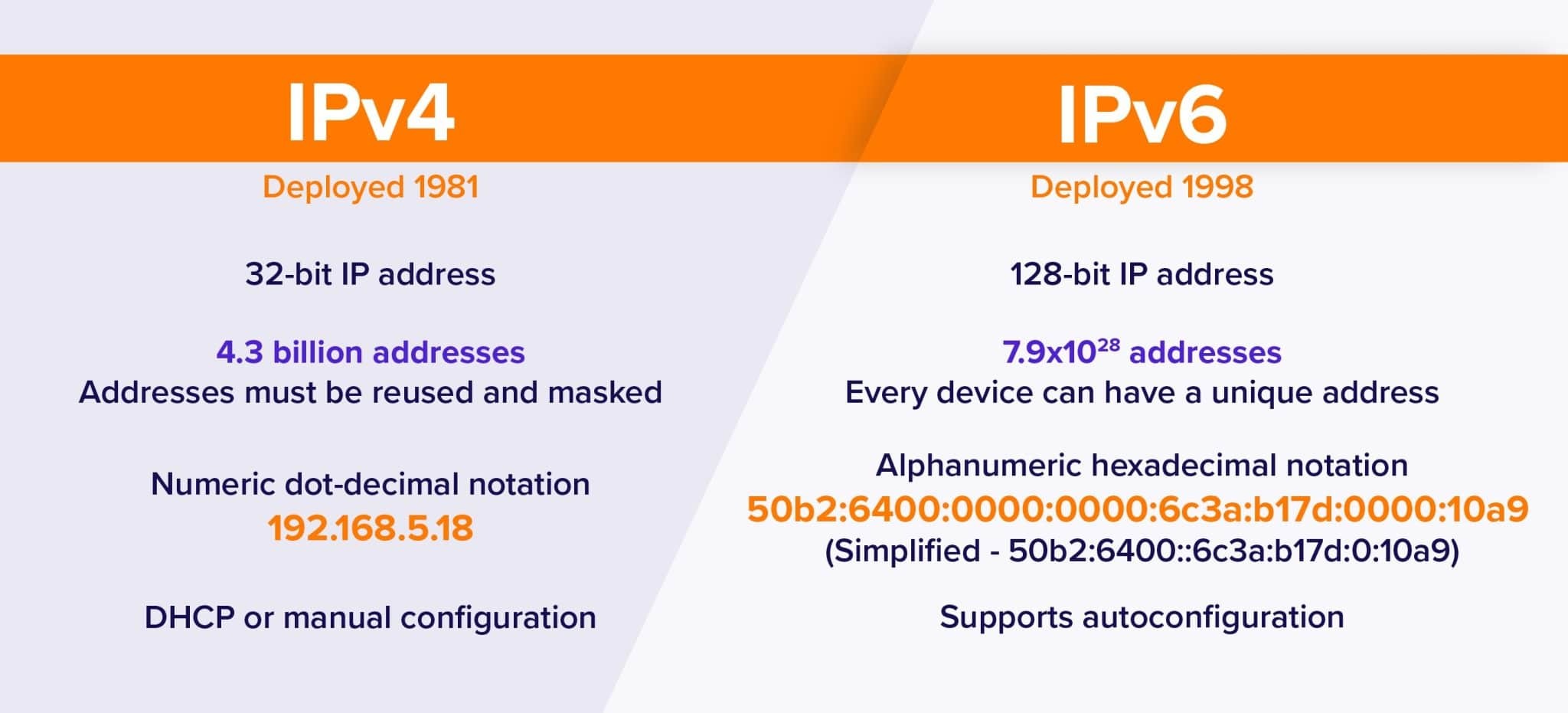
IPv4 is the fourth version of the Internet Protocol and remains widely used. An IPv4 address contains 32 bits and is normally written as four decimal numbers separated by periods. An example is 192.0.2.25.
Each section can range from 0 to 255. This format is easy to read, but the total number of possible IPv4 addresses is limited to approximately 4.3 billion. That number sounded large when the protocol was designed, but the growth of personal computers, mobile devices, cloud platforms and connected equipment created enormous demand for addresses.
IPv4 addresses are often written together with a prefix length, such as 192.0.2.0/24. The /24 indicates how much of the address identifies the network and how much is available for individual addresses. This notation is called CIDR and is used to describe address blocks and routing ranges.
Because IPv4 addresses are scarce, organizations often use techniques such as Network Address Translation, address sharing, leasing and transfers. These methods allow many private devices to access the Internet through a smaller number of public addresses, but they also make network management more complex.
What Is IPv6?
IPv6 is the newer version of the Internet Protocol. It was designed partly to solve the shortage of IPv4 addresses. An IPv6 address contains 128 bits, providing an extremely large address space.
IPv6 addresses are written using hexadecimal characters separated by colons. An example is 2001:db8:1234::10. IPv6 notation allows groups of zeros to be shortened, which makes long addresses easier to write.
The large IPv6 address space allows networks to assign globally unique addresses to a much greater number of devices. IPv6 also includes improvements to protocol design, address configuration and network scalability. However, IPv4 remains deeply embedded in existing infrastructure, so most modern networks use IPv4 and IPv6 together during a gradual transition.
IPv6 does not make routing security unnecessary. IPv6 networks still use BGP for inter-network routing, and administrators still need accurate registry records, route policies and origin authorization. Organizations planning an IPv6 deployment should understand their address allocation, subnet structure and provider requirements before announcing prefixes publicly.
Public IP Addresses
A public IP address is an address that can be routed across the public Internet. It may identify a web server, mail server, VPN gateway, cloud service, firewall or other Internet-facing system.
When a user connects to a website, the website’s public IP address allows traffic to reach the hosting environment. A company may also use public addresses for remote access, external APIs, DNS services or connections between different sites.
Public addresses must be coordinated carefully. Two unrelated networks cannot normally use the same public address at the same time without causing routing conflicts. Public address resources are managed through Regional Internet Registries and their members, sponsoring organizations or service providers.
Having a public IP address does not automatically make a device accessible from the Internet. Firewalls, access-control lists, port restrictions and application settings still determine whether connections are accepted. A public address increases the importance of security controls, but the address alone does not expose every service running on the device.
Organizations that need their own public IPv4 or IPv6 resources may use a sponsoring LIR, lease address space, request an allocation or complete a transfer depending on their requirements and the applicable policies.
Private IP Addresses
Private IP addresses are used inside local or private networks. They are not normally routed directly across the public Internet. Common private IPv4 ranges include 10.0.0.0/8, 172.16.0.0/12 and 192.168.0.0/16.
A home router may assign addresses such as 192.168.1.20 to computers, phones and smart devices. An office may use a larger private addressing plan for workstations, printers, servers and internal applications. These addresses can be reused by many independent networks because they are not intended to be globally unique.
Private IPv4 devices commonly access the Internet through Network Address Translation. The router replaces the private source address with a public address when sending traffic externally. When the response returns, the router maps it back to the internal device.
Private addressing helps conserve public IPv4 space and adds a basic separation between internal systems and the public network. It is not a complete security mechanism, however. Firewalls, authentication, encryption and proper segmentation are still required.
Public IP vs Private IP
The main difference is where the address can be routed. A public IP address is designed to identify a network interface or service on the public Internet. A private IP address is designed for use within an internal network.
A public address must be coordinated to avoid conflicts with other networks. A private address can be reused by many organizations. A device using a private address may still reach the Internet through a router, but external systems normally see the router’s public address rather than the device’s internal address.
This distinction is important for websites, remote access and server hosting. A server that needs to accept connections from the Internet generally requires a public address or a service that provides public reachability. A database server used only by internal applications may be safer with a private address and no direct public exposure.
Modern cloud platforms use similar concepts. Virtual machines, load balancers and managed services may have private addresses inside a cloud network and public addresses for external access. The exact design depends on the provider and the application architecture.
Static IP Addresses
A static IP address is intended to remain stable over time. It may be configured manually, reserved by a DHCP server, assigned to a hosting service or allocated as part of a network provider’s service.
Static addresses are useful for services that need a consistent destination. Websites, mail servers, VPN gateways, remote administration systems, monitoring endpoints and DNS servers often benefit from stable addresses.
A static address makes configuration and access control easier. A firewall can allow traffic from a known address, a DNS record can point to a stable destination, and a remote user can connect without discovering a new address after every restart.
Static does not mean permanent under every circumstance. A provider may change an address during a service migration, contract change or infrastructure redesign. Organizations should maintain accurate records and avoid assuming that a static address can never be replaced.
Dynamic IP Addresses
A dynamic IP address is assigned automatically and may change over time. Home Internet connections commonly use dynamic public addresses, while local networks often assign private addresses through DHCP.
Dynamic assignment allows providers to use address space efficiently. Addresses can be returned to a pool when a customer disconnects and assigned to another customer later. For ordinary web browsing and many consumer applications, this process is invisible.
Dynamic addresses can be inconvenient for services that require a stable destination. Remote access, self-hosted applications, security allowlists and DNS records may stop working when the address changes. Some users solve this problem with Dynamic DNS, which updates a hostname when the current address changes.
A dynamic address is not automatically less secure than a static address. Security depends more on firewall configuration, authentication, patching and monitoring. The main difference is that the address assignment is not intended to remain fixed.
IP Addresses and Domain Names
People usually access websites through domain names rather than numerical IP addresses. DNS connects the two. When a browser requests a domain name, a DNS resolver looks up the corresponding record and returns one or more IP addresses.
A domain can point to a single server, several servers, a content delivery network or a global load-balancing system. This allows the service owner to change infrastructure without changing the name users type into the browser.
The relationship is not always one-to-one. One IP address can host many websites, especially when virtual hosting is used. One domain can also resolve to multiple IP addresses for redundancy, performance or geographic distribution.
DNS does not replace IP routing. It helps users and applications discover an address, while routers use the address to deliver packets. Both systems must be configured correctly for a service to remain reachable.
Can an IP Address Reveal Your Location?
An IP address can provide approximate information about a network’s registered region or service provider. Public databases may associate an address block with a country, city, organization or provider, but the accuracy varies.
IP geolocation should not be treated as a precise GPS location. An address may be registered to a data center, an Internet service provider, a hosting company or a sponsoring organization rather than the actual user. Mobile networks, VPNs, cloud platforms and corporate gateways can make the apparent location different from the user’s physical location.
Websites may combine IP information with browser data, account details, cookies and other signals. The IP address alone usually provides only a broad network-level indication. It does not automatically reveal a person’s name or exact home address.
Organizations that manage public address space should also remember that registry data and geolocation databases may be used by third parties. Keeping registration, abuse contacts and reverse DNS information accurate helps reduce confusion about the intended use of the resource.
Why Do Businesses Need Public IP Addresses?
Businesses may need public IP addresses for websites, email systems, VPN services, application gateways, DNS infrastructure, remote access, cloud connectivity and BGP announcements.
A company that operates across several data centers may require address space that can be announced from more than one location. A network using multiple upstream providers may also need its own ASN and public prefixes to control routing policies and improve resilience.
Some businesses lease IPv4 addresses because obtaining a large independent allocation may be difficult or expensive. Others use IPv6 allocations to support long-term growth and modern network architecture. The appropriate solution depends on the service, traffic model, provider relationships and regulatory requirements.
Public resources should be managed carefully. Before accepting an IPv4 block or IPv6 prefix, an organization should review registry information, routing history, reputation signals and authorization records. The IP Resource Readiness Checker can be used as an initial technical review for a public IPv4 or IPv6 prefix.
IP Addresses and Network Security
An IP address is only one part of network security. Attackers may scan public addresses for exposed services, outdated software or weak authentication. For this reason, every Internet-facing address should be protected by a suitable firewall and monitored for unexpected activity.
Organizations should close unused ports, apply security updates, use strong authentication and encrypt sensitive communications. Access should be limited to the networks and users that actually need it. A public IP address should never be treated as a substitute for proper identity and access controls.
IP reputation is another operational consideration. An address may have a history of spam, malware, abuse or suspicious activity. This can affect email delivery, advertising platforms, fraud systems and hosting services. Before deploying a public address, businesses should conduct reputation checks in addition to reviewing registry and routing data.
RPKI can help validate which ASN is authorized to originate a prefix, but it does not prove that the address is free from abuse history. Routing security and reputation management solve different problems and should be reviewed separately.
Frequently Asked Questions
Is an IP address the same as a MAC address?
No. An IP address operates at the network layer and can be used to route traffic between different networks. A MAC address identifies a network interface within a local network segment. Routers use IP addresses to move traffic between networks, while switches commonly use MAC addresses for local delivery.
Can two devices have the same IP address?
Two devices should not use the same address within the same network because this creates a conflict. Private addresses can be reused in different independent networks, and public addresses must be coordinated to avoid conflicts on the global Internet.
Does restarting a router change the IP address?
It may change a dynamic address, depending on the provider’s assignment system. A static address or a reserved DHCP address is more likely to remain the same. The only reliable way to know is to check the address before and after the restart or consult the network provider.
Is IPv6 replacing IPv4 immediately?
No. IPv4 and IPv6 continue to operate together. Many networks use dual-stack deployment, translation services or other transition techniques. IPv6 adoption is growing, but the timing of migration depends on providers, applications, hardware and business requirements.
Can I host a website with a dynamic IP address?
Yes, but it may require Dynamic DNS and additional configuration. A stable static address is generally easier for production hosting because DNS records, certificates, access rules and monitoring can remain consistent.
Does a public IP address make my computer visible to everyone?
Not necessarily. Firewalls and router policies may block incoming connections. However, a public address can be discovered and scanned, so it should be protected and monitored even when no public service is intentionally hosted.