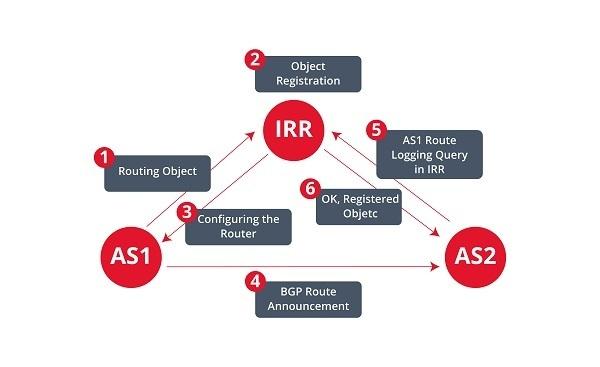
When a network announces an IPv4 or IPv6 prefix through BGP, other networks need a way to decide whether the announcement is expected. Transit providers, Internet exchange points, hosting companies, and network operators often build filters to control which prefixes their customers are allowed to announce.
One source of routing policy information is the Internet Routing Registry, usually called the IRR. An IRR stores objects that describe relationships between IP prefixes and Autonomous System Numbers. The most familiar objects are called route objects for IPv4 and route6 objects for IPv6.
A route object generally states that a particular ASN is expected to originate a specific IPv4 prefix. A route6 object performs the same function for an IPv6 prefix. Network operators can query these objects and use them when creating prefix filters or checking whether a BGP announcement matches the expected routing policy.
IRR data remains widely used, but it should be interpreted correctly. A route object describes routing intent. It does not automatically prove legal ownership, and it does not provide the same cryptographic authorization as RPKI. A strong routing review often considers registry records, IRR objects, RPKI status, and live BGP announcements together.
This guide explains what an IRR route object is, how it is created and queried, how route objects are used by network operators, and how they differ from RPKI.
What Is an IRR?
The Internet Routing Registry is a collection of databases that publish routing policy information. Different IRR databases are operated by Regional Internet Registries, network providers, and independent registry services. Each database may use its own policies, authentication methods, and data quality controls.
The purpose of an IRR is to provide information that can be used to describe expected routing relationships. A network may publish which prefixes it originates, which ASNs it uses, and which networks are allowed to announce routes on its behalf.
Transit providers can query IRR data and generate prefix filters from it. For example, a provider may ask which prefixes a customer’s ASN is expected to announce, then configure its routers to accept only those prefixes. This reduces the chance that a customer accidentally announces an unrelated or excessively large address range.
IRR databases are part of the operational infrastructure of the Internet. They are different from ordinary DNS, domain registration systems, and the RIR registration database. If you want to understand the difference between registration records and routing records, read our guide to What Is the RIPE Database?.
What Is an IRR Route Object?
An IRR route object is a database record that describes an IPv4 prefix and the ASN expected to originate it in BGP. The key attributes are usually the route field and the origin field.
A simplified route object may look like this:
route:      198.51.100.0/24
origin:     AS64500
descr:      Example Network IPv4 route
mnt-by:     EXAMPLE-MNT
source:     RIPE
This object communicates that AS64500 is expected to originate 198.51.100.0/24. The descr field provides a human-readable explanation. The mnt-by field identifies the maintainer allowed to update the object, and the source field identifies the database containing the record.
The object is a routing policy record. It does not announce the prefix, allocate addresses, or create a BGP session. A network still needs to configure BGP and establish connectivity with an upstream provider or peer.
The object also does not automatically prove that the ASN owns the address space. A route object may be legitimate when a provider announces a customer’s prefix, but the relationship should be supported by appropriate registry records, contracts, authorization, or sponsoring arrangements.
What Is a Route6 Object?
A route6 object performs the same basic function for an IPv6 prefix. The main difference is the address family represented in the route6 field.
A simplified IPv6 route6 object may look like this:
route6:     2001:db8:1234::/48
origin:     AS64500
descr:      Example Network IPv6 route
mnt-by:     EXAMPLE-MNT
source:     RIPE
This object states that AS64500 is expected to originate the IPv6 prefix 2001:db8:1234::/48. An IPv6 network may use several route6 objects if it intentionally announces multiple prefixes or uses more than one origin ASN.
The same operational rules apply as with IPv4 route objects. The route6 object describes expected routing policy, but it does not itself make the prefix visible in BGP. The IPv6 prefix must still be configured on routers and accepted by upstream networks.
When reviewing a dual-stack deployment, check the IPv4 route object and IPv6 route6 object separately. A company may have correct IPv4 routing information while its IPv6 object is missing, outdated, or associated with a different origin ASN.
What Information Does a Route Object Contain?
The route or route6 attribute identifies the IP prefix. The origin attribute identifies the ASN expected to originate the prefix. These are the two fields most network operators use when creating routing filters.
The descr field describes the purpose of the object. It may contain a network name, customer reference, or operational note. This field is useful to people but normally does not determine whether a filter is generated.
The mnt-by field identifies the maintainer responsible for updates. A maintainer object normally defines the authentication method and the people or systems allowed to modify related records. Some databases use additional authentication or authorization mechanisms for sensitive objects.
The source field identifies the IRR database. A query may return records from RIPE, RADB, APNIC, ARIN, or another source. When the same prefix appears in several databases, operators need to understand which source they trust and whether duplicate objects are current.
Other attributes may include remarks, member-of, created, last-modified, and references to related objects. The available fields vary according to the database and object type.
Why Do Network Operators Use Route Objects?
The main use is automated prefix filtering. An upstream provider can query the IRR for a customer’s ASN and retrieve the prefixes that customer is expected to announce. The provider can then generate a filter that accepts those prefixes and rejects unexpected ones.
This can prevent accidental route leaks. If a customer router is misconfigured and announces a large internal range or another organisation’s prefix, a correctly generated upstream filter may block the announcement before it reaches the wider Internet.
Route objects also help during onboarding. When a customer begins using a new prefix, the provider can compare the requested announcement with the customer’s IRR data. If the object is missing, the provider may ask the customer to create or update it before enabling the route.
Network operators also use route objects during troubleshooting. If a BGP route is rejected, the IRR record can show whether the expected origin ASN and prefix are documented. An outdated object may explain why a provider’s filter does not accept a legitimate announcement.
The usefulness of the object depends on its accuracy and the provider’s trust in the database. An incorrect route object can create filtering problems, while an overly broad or unauthorised object can weaken the value of the filtering process.
How to Query an IRR Route Object
The easiest method depends on the database and tools available on your system. Many network administrators use a command-line whois client to query IRR information.
A basic query against the RIPE Database can be performed with:
whois -h whois.ripe.net 198.51.100.0/24To search for route objects associated with an origin ASN, a query may use an inverse search:
whois -h whois.ripe.net -- "-i origin AS64500"The exact query flags can vary between WHOIS clients and databases. If the result is incomplete, use the database’s web interface or consult its query documentation.
You can also query a route registry such as RADB:
whois -h whois.radb.net 198.51.100.0/24The returned output may contain one or more route objects. Review the prefix, origin ASN, source database, maintainer, and last-modified information. Do not assume that the first result is automatically the authoritative or correct one.
For an IPv6 route6 object, query the IPv6 prefix:
whois -h whois.ripe.net 2001:db8:1234::/48When using a web-based query, enter the full prefix and inspect the object type. A registration object such as inetnum or inet6num is different from a routing object such as route or route6.
How to Check a Route Object in the RIPE Database
The RIPE Database contains both Internet number resource records and routing-related objects. Open the RIPE Database search interface and enter the IPv4 or IPv6 prefix you want to investigate.
The search may return multiple objects related to the same resource. Look specifically for an object whose type is route for IPv4 or route6 for IPv6. Then check the origin attribute and compare it with the ASN currently observed in BGP.
The source field shows where the object is stored. A route object with source: RIPE comes from the RIPE Database. A result from another source may be visible through an IRR query system but have different authentication, update, and data-quality rules.
The RIPE Database record should be reviewed together with the resource’s inetnum or inet6num object. The registration object provides information about the address resource, while the route object describes expected BGP origin.
This comparison can reveal mismatches. For example, the route object may list AS64500, while live BGP data shows AS64510. That could be a planned migration, an outdated object, a provider arrangement, or an incorrect announcement.
How to Create a Route Object
Creating a route object normally requires access to the relevant IRR database and permission to maintain the related resource. In the RIPE service region, the object may be created through the RIPE Database interface or an approved management process connected to the sponsoring LIR.
Before creating the object, prepare the exact prefix and origin ASN. Confirm that the prefix is written correctly and that the ASN is the one that will appear as the BGP origin. If a transit provider carries the route but does not originate it, use the actual origin ASN according to the routing design.
A basic route object contains values similar to:
route:      198.51.100.0/24
origin:     AS64500
descr:      Example Network route
mnt-by:     EXAMPLE-MNT
source:     RIPE
The maintainer and authentication fields depend on the account and database. A provider may ask you to submit the object through a portal, email a template, or update it using an authenticated API or database interface.
After creating the object, query it again and verify that the prefix, origin, source, and maintainer are correct. Then coordinate with the upstream provider so that its filter-generation system retrieves the update.
The route object does not make the route visible immediately. The provider may refresh its filters on a schedule, and BGP still needs to be configured and accepted. Allow time for both the IRR update and the routing change to appear.
How to Update or Remove a Route Object
Update a route object when the origin ASN changes, the announced prefix changes, or the routing arrangement is redesigned. A provider migration that keeps the same origin ASN may not require a route object change, but the provider’s filter process should still be checked.
An ASN migration usually requires the origin attribute to change. If the old origin remains in the object while the new ASN announces the prefix, the provider may reject the route or another network may see inconsistent routing information.
An IPv4 transfer can also require an update. The receiving organisation should coordinate the route object change with the current holder, sponsoring LIR, and upstream providers. The timing should be included in the migration plan so that the object reflects the expected origin when the new announcement becomes active.
Remove obsolete objects when a prefix is no longer originated by the ASN listed in the record. Leaving old objects active can create confusion and may cause filters to accept routes that the organisation no longer intends to announce.
After every update or removal, query the database again and check the relevant BGP announcements. The change should be verified from both the database and the routing perspective.
Route Objects and BGP Announcements
A route object describes what an operator expects to happen. A BGP announcement shows what is actually being announced. These are separate data sources.
For example, an IRR object may state:
route:  198.51.100.0/24
origin: AS64500
But current BGP data may show that AS64510 is originating the prefix. The difference does not automatically identify the cause. It may be an uncompleted migration, a provider announcement, stale routing data, or a configuration problem.
The useful question is whether the observed route matches the documented plan. If AS64510 is an approved temporary origin, the route object and provider filters may need to be updated. If the origin is unexpected, investigate before accepting the route as legitimate.
For a detailed explanation of origin data, read How to Find the Origin ASN of an IP Prefix. That article explains how to compare public BGP observations with the expected routing design.
Route Objects and RPKI
IRR and RPKI provide related but different types of information. An IRR route object is a routing policy record that says which ASN is expected to originate a prefix. RPKI uses cryptographically signed authorizations to validate whether an ASN is authorized to originate it.
An IRR object can exist without a ROA. A ROA can exist without a route object. Some network operators use both systems because they support different filtering and validation workflows.
A route object may be accepted based on database authorization and maintainer credentials. RPKI validation is based on the resource certificate chain and signed authorization data. The trust model, update process, and operational use are different.
When reviewing a prefix, compare both results. If the IRR object and RPKI authorization identify the same ASN and live BGP data shows that ASN as the origin, the routing information is consistent. If they disagree, find out whether the difference is intentional or caused by stale or incorrect records.
Read What Is RPKI? and What Is a ROA in RPKI? for more detail about cryptographic origin authorization.
Common Route Object Problems
A missing route object can cause a provider to reject a customer announcement if the provider relies on IRR-based filters. The route may be valid and visible elsewhere, but the customer’s upstream may not accept it until the expected object is created.
An outdated origin ASN is another common problem. The object may still refer to a former provider or old ASN after a migration. The new BGP announcement can then fail filtering even though the network configuration is correct.
Overlapping or duplicate objects can make results difficult to interpret. Some databases may contain multiple objects for the same prefix, and different providers may use different IRR sources. The presence of an object does not guarantee that every provider will use it or trust it.
An overly broad object can also be a problem. A large prefix may cover address space that the organisation does not actually intend to announce. Prefix filters should reflect the real routing plan, and operators should avoid publishing objects simply to make a filter generator accept a route.
Finally, a route object may contain a correct prefix and origin but use a maintainer that no longer belongs to the responsible organisation. Updating the data without reviewing account access and authentication can leave the record difficult to maintain during the next change.
How to Troubleshoot a Rejected BGP Announcement
Start by recording the exact prefix, origin ASN, upstream provider, and time of the attempted announcement. Then query the relevant IRR databases and look for a matching route or route6 object.
Check that the object uses the exact prefix length being announced. A route object for 198.51.100.0/24 may not satisfy a provider expecting a different prefix length, such as 198.51.100.0/25, depending on its filter policy.
Check the origin ASN carefully. The ASN in the object must match the ASN that appears as the route origin in the BGP announcement. A provider ASN that transports the route is not necessarily the correct origin value.
Next, check RPKI. If the route object is correct but RPKI reports Invalid, the problem may be a stale ROA or an incorrect maximum prefix length. If both IRR and RPKI are correct, ask the provider whether its filter database has refreshed and whether it applies additional internal policy.
After making a change, query the object again and record the new result. Then confirm that the provider has reloaded its filters and that the route is visible in BGP.
Route Object Review Checklist
Before announcing a public IPv4 or IPv6 prefix, confirm the following information in one place:
- The exact prefix and address family.
- The intended origin ASN.
- The matching
routeorroute6object. - The relevant IRR source and maintainer.
- The current RPKI status.
- The observed BGP origin.
- The upstream provider’s filter requirements.
- The date and time of the most recent review.
This information can be maintained in a network change ticket or IP resource inventory. The goal is to make each source agree with the intended routing design and to make changes easier to audit.
A public lookup tool can assist with the technical part of this review. The IP Resource Readiness Checker can help bring registry, origin ASN, route object, RPKI, and BGP visibility information into one report for a public IPv4 or IPv6 prefix.
Frequently Asked Questions
Does a route object announce a prefix?
No. A route object stores routing policy information. The network still needs a working BGP configuration, an upstream or peering session, and a provider that accepts the route.
Does a route object prove IP ownership?
No. It identifies an expected routing relationship. Ownership and resource rights depend on registry records, contracts, transfer documents, and the applicable RIR policies.
Is a route object the same as a ROA?
No. A route object is stored in an IRR and is used for routing policy and filter generation. A ROA is an RPKI authorization that uses cryptographic validation to identify an allowed origin ASN and prefix length.
Do IPv6 prefixes use route objects?
Yes. IPv6 prefixes use route6 objects. The object describes the IPv6 prefix and its expected origin ASN.
Why is my route visible in BGP but rejected by my provider?
The provider may use IRR filters, RPKI filtering, prefix-length rules, customer policy, or additional internal checks. Review the route object, ROA, announced prefix length, origin ASN, and provider refresh status.
Can several ASNs be listed for one prefix?
Yes, when the routing design intentionally uses multiple origins. Each authorized origin should be documented and reflected appropriately in IRR and RPKI data. Unexpected multiple origins require investigation.
An IRR route object is a routing policy record that describes which ASN is expected to originate an IPv4 prefix. The IPv6 equivalent is a route6 object. Network operators use these records to build prefix filters, review customer announcements, and document expected routing relationships.
A route object does not announce the prefix and does not prove legal ownership. Its value depends on accurate data, responsible maintenance, and the policies of the networks that use it. An outdated or missing object can cause a legitimate route to be rejected, while an overly broad or incorrect object can create operational and security problems.
For a reliable prefix review, compare the route or route6 object with the registry record, live BGP origin, RPKI status, and actual provider arrangement. When these sources match the intended design, troubleshooting and change management become much easier.